Multiple Values (Templates)
The Multiple Values (Templates) tab (formerly called "Value Comparison") contains settings for handling attributes that consist of several distinct values separated by a special character.
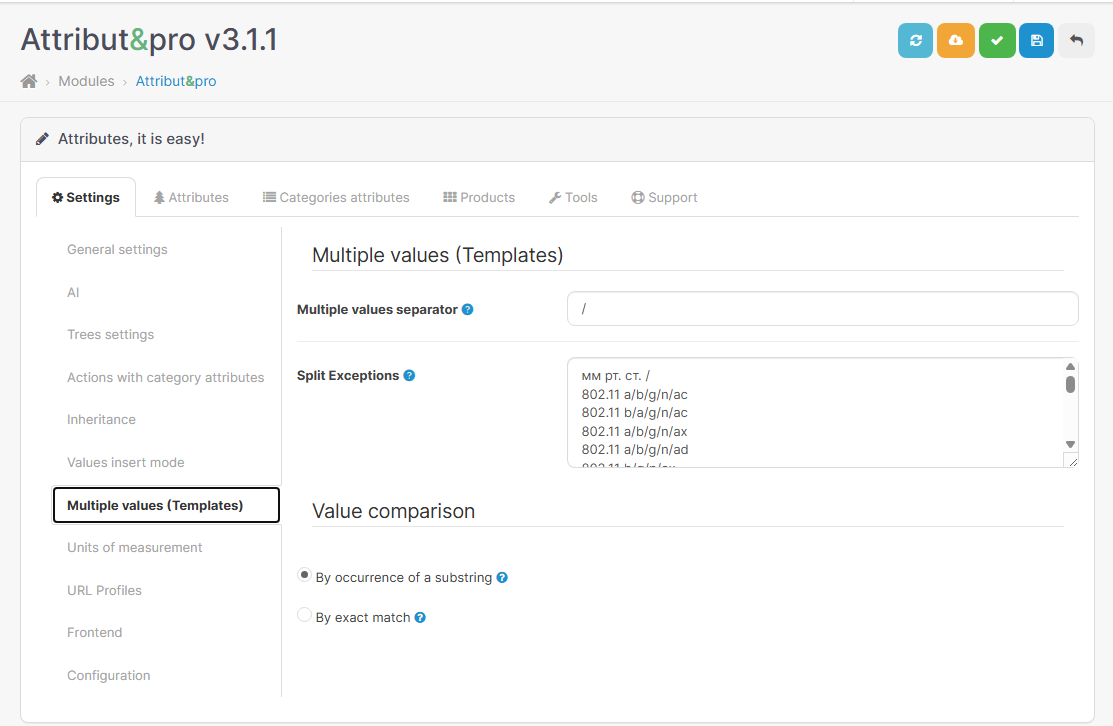 |
|---|
| Multiple values and comparison settings |
Splitter (Separator)
A Splitter is a character or a sequence of characters used to divide a single long text (Template) into separate, independent Values.
The splitter allows the module to understand that the entry v1.5.x/2.0.1/2.1.x is not one long string, but three different versions that the filter should process individually.
Splitter Configuration
- Input field: The separator character (e.g.,
/,,,;,|). - Restrictions: Letters, numbers, quotes, and square brackets are not allowed.
- Compatibility: It is recommended to use the same splitter as the one configured in your filter (Mega Filter Pro, OCFilter, etc.).
Splitter Examples:
| Original String | Splitter | Resulting Values |
|---|---|---|
Red, Blue, Green | , | Red, Blue, Green |
16GB/32GB/64GB | / | 16GB, 32GB, 64GB |
Wi-Fi 6; Bluetooth 5.0 | ; | Wi-Fi 6, Bluetooth 5.0 |
Split Exceptions
Sometimes an attribute value contains a character that matches the splitter, but this value should not be split.
How Exceptions Work
The module uses a combined list of exceptions:
- User List: You can manually add values to the text field (one value per line).
- Hardcoded Defaults: The module includes built-in common exceptions (Wi-Fi standards,
TCP/IP,S/PDIF, etc.). - Automatic (Units of Measurement): All units from your database that contain a slash (e.g.,
km/h) are automatically added to the exceptions list.
Exception Example:
Suppose your splitter is /.
| Value Type | Attribute Text | Without Exceptions (Error) | With Exceptions (Correct) |
|---|---|---|---|
| Simple | Black/White | Black, White | Black, White |
| Complex | 802.11 a/b/g/n | 802.11 a, b, g, n | 802.11 a/b/g/n |
When processing text, the module first identifies all matches from the exceptions list, "masks" them, splits the remaining text by the splitter character, and then restores the exceptions to their original form.
Units with Slashes
Handling units of measurement is fully automated. If you use the Units module and have added a unit with a slash (e.g., km/h), it automatically becomes an exception.
Automated Processing Example:
Splitter: /.
Database value: 60 km/h / 120 km/h.
- The module detects that
km/his a known unit of measurement. - It understands that the slash inside
km/his part of the unit, not a value separator. - Result: The module correctly splits the string into two values:
60 km/hand120 km/h.
Value Comparison Modes
This setting determines how the module searches for and updates values when they are edited or deleted.
1. By Substring (Substr)
Searches for any occurrence of the text within a string.
Examples (Substr):
- Successful Update: Replacing
MP4withMP3.- Before:
MP4/AVI,MP4-MPEG4/VOB - After:
MP3/AVI,MP3-MPEG4/VOB
- Before:
- Error (False Positive): Replacing
50with50g.- Before:
50,500,50-100 - After:
50g,50g0,50g-100(The value500is corrupted!)
- Before:
2. Exact Match (Match)
Searches only for an exact match of the value (considering splitters).
Examples (Match):
- Safe Update: Replacing
50with50g.- Before:
50,500,50-100 - After:
50g,500,50-100(Values500and50-100remain untouched)
- Before:
The selected mode affects:
- Editing: Updating text via the quick editor.
- Deletion: Clearing values from products.
- Selection: Which products appear in the tree when clicking a value. In Match mode, clicking
20will not show products with values like120or200.
Comparison and Units of Measurement
All comparison algorithms account for units of measurement by masking them during processing.
Example:
Attribute: Weight. Value: 10 kg.
If you perform a merge or search, the module will "hide" the kg during comparison, find the number 10, perform the required action, and then restore the unit. This prevents unit duplication or loss during bulk operations.