Managing Attribute Statuses
The Attribut&pro module provides a convenient and flexible mechanism for managing the visibility of attributes and their individual values, both in the admin panel and on the storefront. This allows you to temporarily hide specific product features without needing to delete them entirely.
Overview and Storefront Filtering
The status system works on a cascading principle:
Any attribute or its specific value set to Disabled status (status = 0) is automatically hidden on the product page in the public area of your store.
- If the entire Attribute is disabled, none of its values will be shown to the customer, regardless of their individual statuses.
- If a specific Value is disabled (for example, only for the English language or for a specific product), only that specific value will be hidden.
This filtering functions natively for both OpenCart versions (OC3 and OC4) thanks to built-in modifications to the getProductAttributes queries.
In addition, disabled attributes and values are automatically excluded from the standard OpenCart filter (Filter module), preventing customers from searching for products using characteristics you have hidden. As for third-party filtering modules, their ability to respect attribute statuses depends entirely on their specific implementation and architecture.
Visual Indicators in the Admin Panel
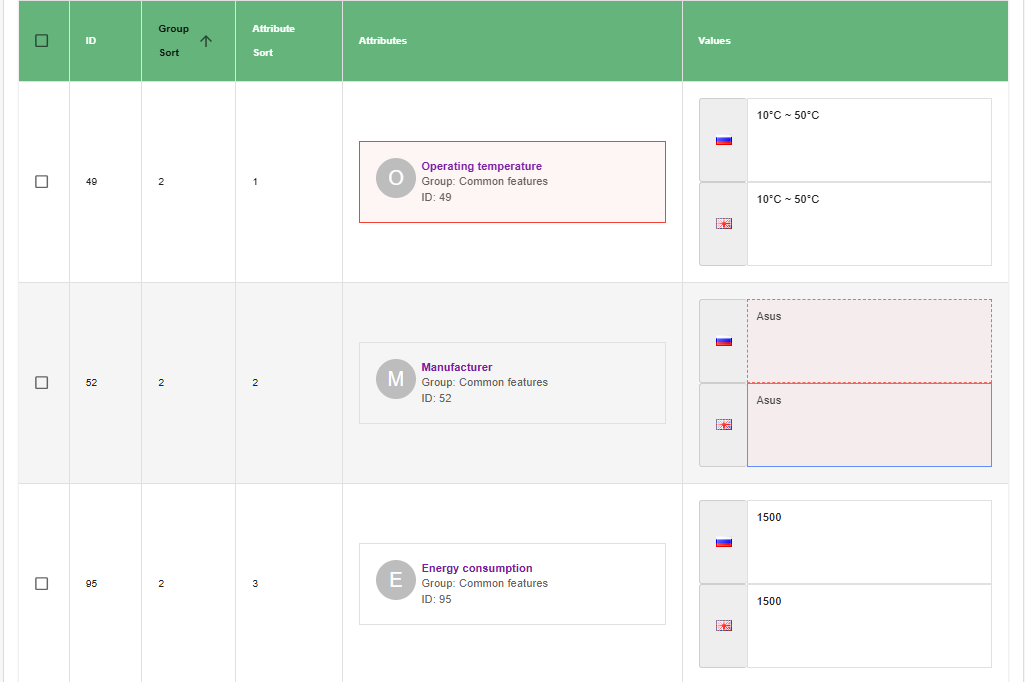
For the administrator's convenience, an intuitive color-coded indication system is integrated into the "Attributes Pro" editing tab on the product form:
- Disabled Attribute: Highlighted with a solid red border and a light reddish background (
rgba(244, 67, 54, 0.05)). - Disabled Value: The block containing the individual value text (next to the language flag) is outlined with a dashed red line, has a light reddish background, and slightly reduced opacity.
This system allows you to easily identify at a glance which characteristics are currently hidden from customers.
 |
|---|
| Status Visual Indication (English) |
How to Change Statuses
There are two primary ways to manage visibility: through detailed edit forms and via a quick context menu.
1. Metadata Edit Forms (Primary Management)
For complete control over an attribute and its values, statuses are integrated directly into the metadata editing forms:
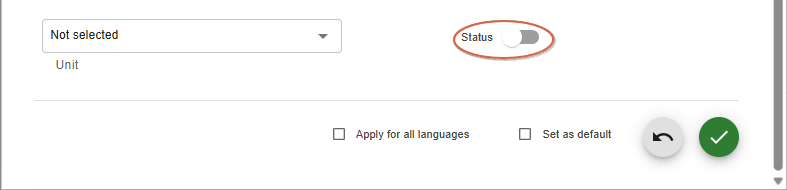
- Global Attribute Status is controlled by a toggle switch in the attribute's metadata editing form (
AttributeForm). This applies globally. - Value Status is controlled by a toggle switch in the specific value's metadata editing form (
ValueForm).
 |
|---|
| Attribute Status Edit (English) |
 |
|---|
| Value Status Edit (English) |
2. Context Menu (Quick Toggling)
To quickly change statuses while working with a product form, there is no need to open complex forms. The module implements quick operational management via a context menu:
- For the Entire Attribute: Right-click (RMB) on the block with the desired attribute's name (on the left side of the list). In the context menu that appears, select "Disable Attribute" (or "Enable Attribute").
- For a Specific Value: Right-click directly on the value text block (next to the language icon). A context menu will appear (e.g., "Disable Value").
 |
|---|
| Attribute Status Toggle (English) |
Toggling a value's status via the context menu is applied synchronously across all active languages. If you right-click on the English value of an attribute and disable it, the status will automatically be switched for Russian and all other localizations of that product as well. The interface will instantly update for all language blocks on the screen.
All status changes are automatically and seamlessly saved to the database (using INSERT ... ON DUPLICATE KEY UPDATE), ensuring data integrity even during intensive catalog work.