URL Profiles
Profile Management
You can add, edit, or delete profiles. Actions are selected using the buttons to the right of the dropdown field.
 |
|---|
| Profile manage |
The selected profile must be saved along with other settings. It will later be used to auto-generate links.
Profile Editing
The edit form allows you to define rules for generating links to filter landing pages or interlinking pages.
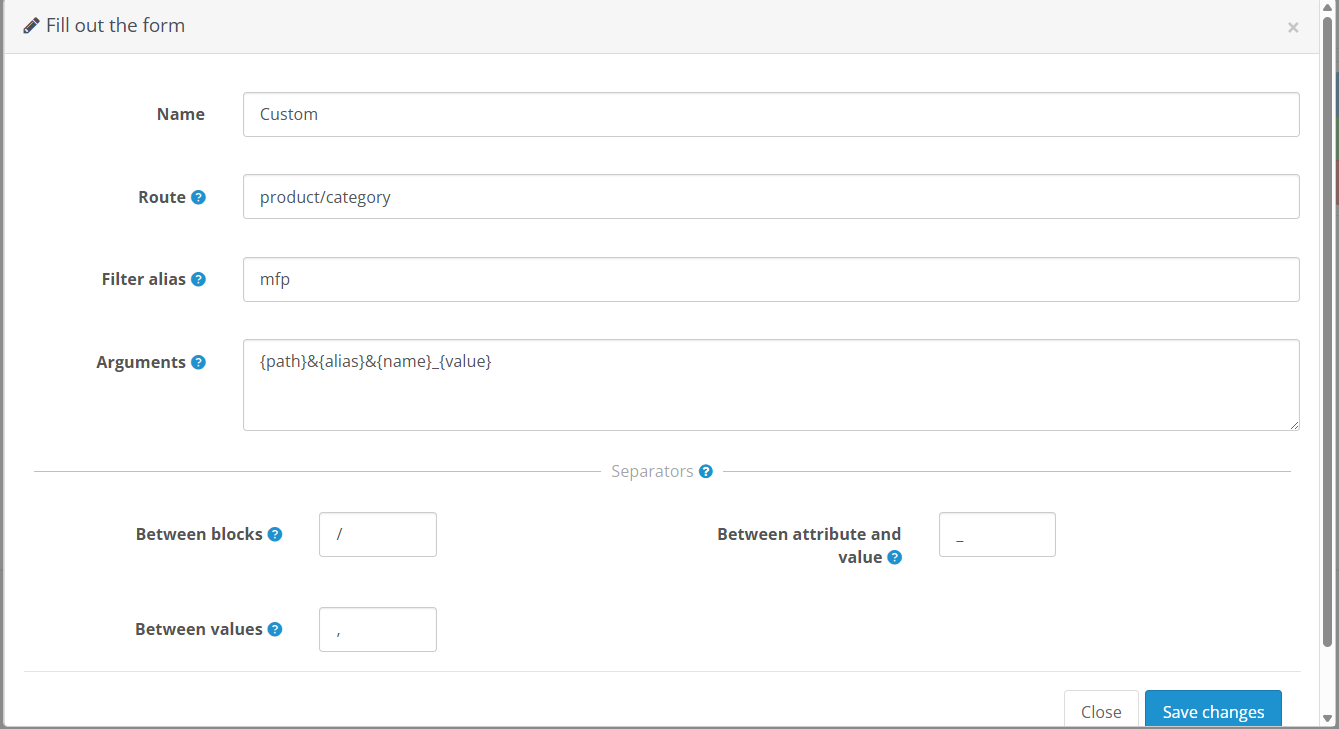 |
|---|
| Profile form |
Route
The site page where products will be displayed. Usually product/category.
The full route looks like: index.php?route=product/category.
Filter Alias
A short filter identifier to be added to the route. For example, mfp for Mega Filter Pro.
Arguments
A set of arguments used to build the URL string. The following variables are available:
| Variable | Description |
|---|---|
{attribute_id} | Attribute ID |
{name} | Attribute name |
{product_id} | Product ID |
{main_category_id} | Main category ID |
{category_id} | List of product categories separated by a delimiter |
{path} | Full category path: main_category_subcategory... |
{value} | Value or list of values separated by a delimiter |
{alias} | Filter alias (if set) |
During auto-generation, variables are replaced with their values pulled from the database.
Delimiters
Between Blocks
Delimiter between filter parameter blocks.
Example: Attribute1_Value/Attribute2_Value.
Between Attribute and Value
Example: Attribute_Value.
Between Values
Example: Value1,Value2,Value3.
SQL Migration
You can use ready-made tables that contain sample profiles. The tables are included in the distribution package.
Import the oc_attribute_interlink.sql table into your database.
| Profile | Purpose |
|---|---|
| Default | For the built-in OpenCart filter |
| Custom | For Mega Filter Pro |