Metadata Editing
Accessing Metadata Editor
Launch the metadata form using:
Shift + Clickin single-line edit modeF2key on selected node- Context menu → "Form"
Opens in modal window:
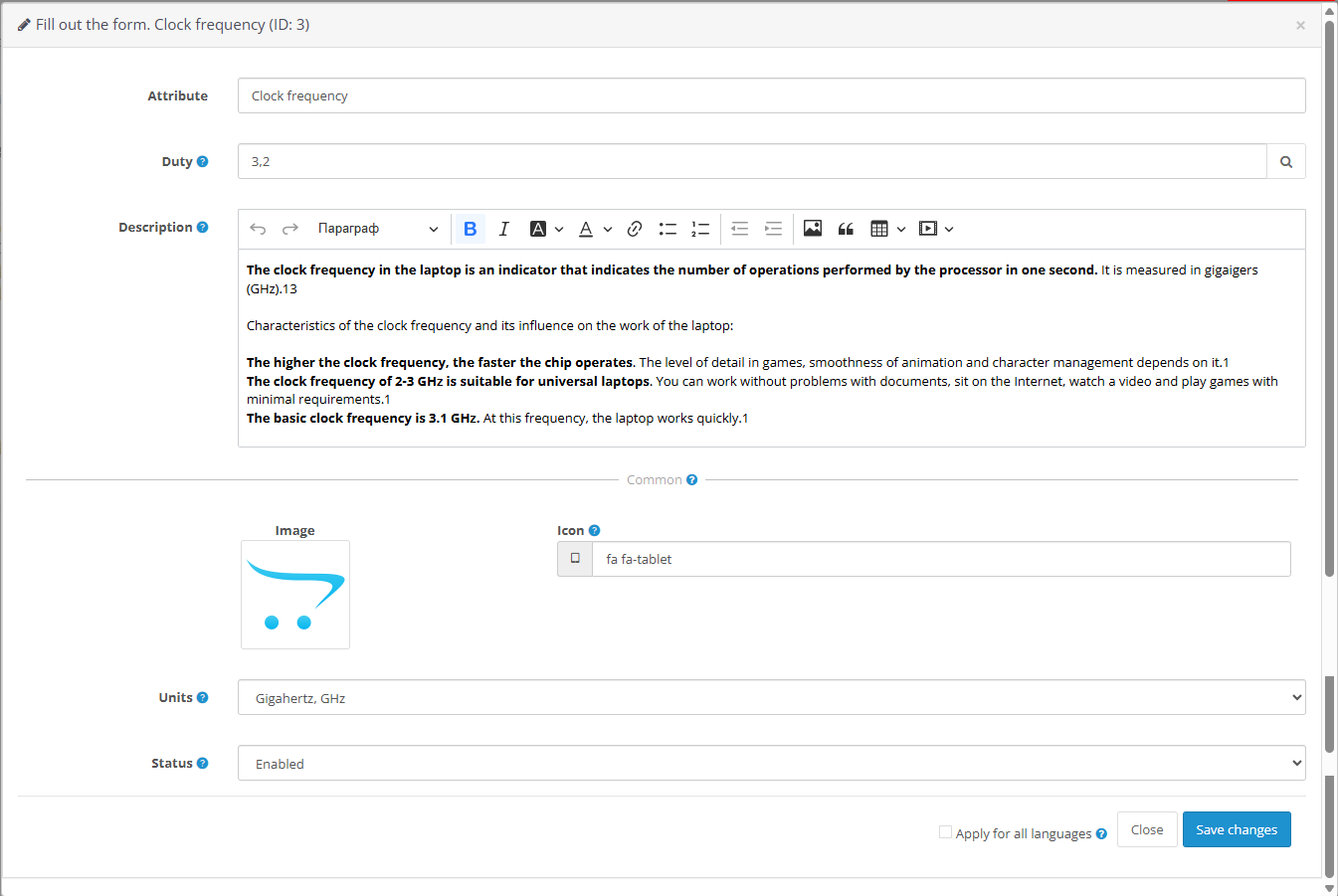 |
|---|
| Attribute Metadata Editor |
Duty Template Configuration
Value Input
- Edit Duty Template value directly in text field
- Use autocomplete (magnifier icon) to load existing product values
- Filters dynamically as you type (e.g., "3" → "3.0", "3.2", "3200")
 |
|---|
| Value Suggestions |
Advanced Metadata
Configure template-specific metadata via dedicated form
Editor Features
WYSIWYG Editing
- Powered by CKEditor (official docs)
- Supports rich text formatting for tooltip descriptions
Localization Handling
| Metadata Type | Behavior |
|---|---|
| Localizable | Language-specific (above separator line) |
| Global | Applies to all languages (below separator) |
Clone Across Languages:
Enable Apply to all languages checkbox before saving
Media Management
Image Upload
- Click Image button
- Select file via OpenCart's file manager
Icon Implementation
- Use Font Awesome library classes without HTML wrappers
- Example:
fa fa-tabletdisplays tablet icon
 |
|---|
| Image/Icon Setup |